

If you use spreadsheets to help staff or team members collect/collate data for database entries, yes I know it’s bad but sadly everyone I know still deals with this somewhere in their workflow when managing websites for clients. Then this trick will vastly improve your productivity when creating said data entry spreadsheets or importing the data to your MySQL tables.
This works in Google Sheets, not Microsoft Excel, because Microsoft Excel is horrible and anyone who isn’t using cloud based office tools is crazy. This snippet will simply auto increment a field, typically you want this to be your “id” field as data is entered into rows in your sheet.
As data is entered in the row and more importantly the next row, this little function will increment the corresponding rows id field automatically. This will make it much much easier to import into MySQL via an import event.
If you hate the clutter and inelegance of the latest iteration of gmail in 2018, than you are not alone, I’m not much of a fan either.
Personally the one thing I truly could not abide in the new gmail was what are known as “attachment chips” which will appear under the subject of every single email that contains attachments, no thanks. I could not find a good reason for these to be filling up half of the screen space in my inbox, so I went looking for a way of turning them off.
If you don’t know what attachment icons or attachment chips are, see the following photos. If you do know what they are and want to get rid of them like me and turn them off, just follow the instructions that are coming up next, super easy, barely an inconvenience.
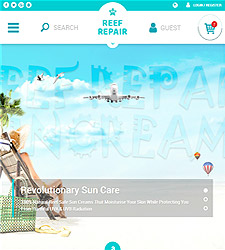
Sometimes it is nice to actually help out with a cause that is near and dear to ones heart. For me this project for Reef Repair was just such an endeavor, combining my love of scuba diving with that of protecting coral reef which is vitally important to creating healthy and living oceans.
Reef Repair – Sun Care Products started out selling Reef Safe Sun Cream, sunscreens and after sun care products to not much more than dive shops in Phuket, Thailand. But in a small space of time has become a major player in the Reef Safe sunscreen market and they needed a website to help them grow.
Visit
Reef Repair – Reef Safe Sun Cream
Do you want to edit WordPress’s “index.php” and not have it be over written every time WordPress updates? Well There is a solution to this problem and it’s stupid simple.
Before you start chomping at the bit and commenting that you “SHOULD NOT” for any reason edit core WordPress files, let me get to my next point.
There are perfectly valid reasons for wanting to edit WordPress’s “index.php” file, usually it is a single line of code to include a class or set of PHP functions that you want at the very highest level of your website or application.
This solution lets you run code before WordPress begins, while not editing any WordPress Core files!
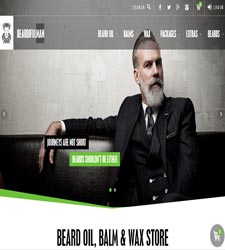
Let me ask you a question? Do you or someone you know have a problem with beard? If you said yes, then you are at risk of serious beard related problems and probably didn’t even know it. Help stop bearded men from causing beard rash, from itching, dry skin and looking like a shaved pussy, help get wild untamed man manes under control and help save innocent beards by discovering Beardifulman – Beard Oil, Balm & Wax · Beard Care Products Store!
Visit
Beardifulman – Beard Care Products
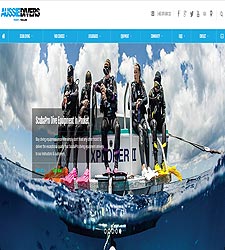
Looking for the most exceptional and highest quality scuba diving provider in probably all of South East Asia? Well look no further than Aussie Divers Phuket. Aussie Divers has been instrumental in improving the service level for customers for both on board and off boat diving related activities with a massive focus on customer service and safe diving practices, nothing else in Thailand even comes close.
Visit
Aussie Divers – Scuba Diving Phuket
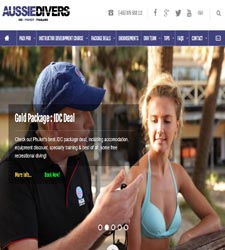
Are you stuck working in a bank, or any job you hate, are you wishing to get away and start a whole new life and career, that involves way more sun, sand, sea and surf, well the job you are actually looking for is that of a Scuba Diving Instructor!
Aussie Divers Phuket latest service is what we call IDC’s or Instructor Development Courses in Phuket, follow the link to find out more. But essentially you can’t just become an instructor, it requires some expert training in scuba diving which is what Aussie Divers IDC Courses will mold you into.
Visit
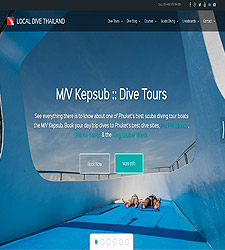
Local Dive Thailand – Scuba Diving Phuket Tours & Liveaboards, this is a new website designed and built by A Plus Design. Was one of my premier builds because the client was happy for me to run with as much design and development rope as I could handle, leaving me alone to develop a product that will be timeless, beautiful and functional.
Local Dive Thailand are one of Phuket’s main liveaboard booking operators offering trips to the Similan Islands and other remote location all over South East Asia at amazingly affordable prices. So feel free to check them out, I certainly learned a lot about the amazing diving locations Phuket and Thailand have to offer while building this website!
Visit
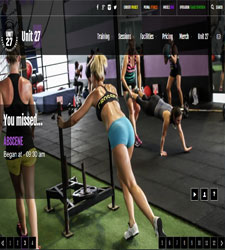
If you are a fitness fanatic or just looking for the next chapter in your weight loss and fitness training, look no further than Unit 27 – Fitness & Weight Loss Phuket. Unit 27 is a purpose built fitness and weight loss training facility in the heart of Phuket, Thailand and they only employ the absolute best CrossFit and Conditioning coaches, nothing else comes close to the level of training and service that Unit 27 provides!
Visit
Unit 27 – Strength & Conditioning Gym Phuket
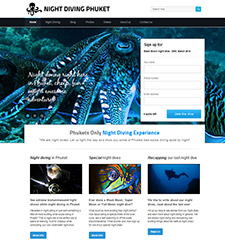
Night Diving Phuket, a new website designed and built by A Plus Design. Fairly simple build and design all done in house, small backe-end admin system for adding dives and approving testimonials and confirming divers, loved the artwork for the title images much of it is un-edited, they have some very serious underwater photography going on.
Night Diving Phuket is simply a group of Phuket diving professionals who enjoy Night Diving and one day got together and decided that there needed to be a less ad-hoc and less on demand system for night diving there, so they created a series of schedueled special dives from certain special times of the Lunar calendar, like Full Moons, New Moons, Supers Moons, Micro Moons and funnily enough even Blue Moons. This way they could promote the night diving and get more and more people interested in the underwater world.
I learnt quite a lot building this web-site, as a diver myself it was great to learn that over half the animals that live on coral reefs are nocturnal, which means if you never dive at night, then you will only ever see half of what lives there. Plus my favorite ocean critter is the Octopus, again he is nocturnal so I will definitely be joining Night Diving Phuket for some nighttime scuba diving adventures!


